The Last 20%: What AI Won't Finish for You Before Launch
AI gets you to a working demo fast. The last 20% (errors, emails, payments, accessibility, languages, privacy, backups) is what turns it into a product. Twelve things AI usually leaves unfinished, how to check each one, and what to ask your AI.
··15 min read
There's an old joke in software called the ninety-ninety rule: "The first 90 percent of the code accounts for the first 90 percent of the development time. The remaining 10 percent of the code accounts for the other 90 percent of the development time." It's credited to Tom Cargill of Bell Labs and was made famous by Jon Bentley in 1985.
AI made the first part much faster. Today you can describe an app in the morning and click through a working demo in the afternoon. But the joke is still true. The last part, the part that makes a demo into a product people can rely on, still takes real work.
I see this every day while building with an AI coding agent. Sign-up worked very early. The real work was everything around it: codes that expire after 15 minutes and five tries, limits on how many emails one address can receive, emails that look right in dark mode and in Outlook, and all of it in three languages.
This post is about that last part. I call it the last 20%: twelve things AI usually doesn't finish unless you ask, how to check each one, and what to ask your AI.
In short
AI builds the happy path: the screens and steps you see in a demo. Real users bring everything else: errors, empty lists, long names, slow phones, other languages.
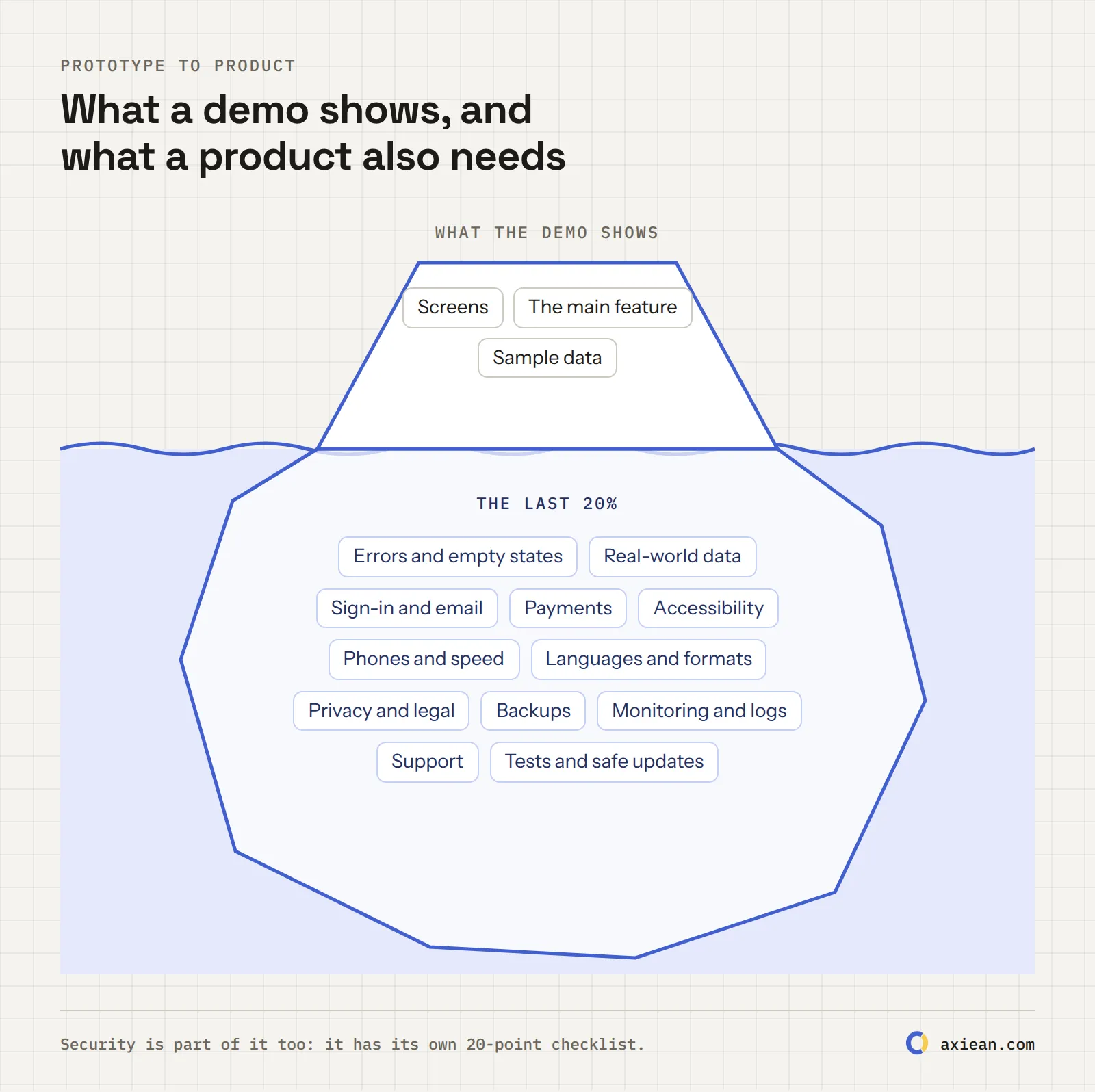
The last 20% is 12 areas: unhappy paths, real-world data, sign-in and email, payments, accessibility, phones and speed, languages and formats, privacy and legal, backups, monitoring, support, and safe updates.
You don't need all of it on day one. Do security, backups and sign-in before launch, and plan the rest for the first month.
Every item below has a 10-minute check and a prompt for your AI.
Why the last 20% takes so long
A demo has to work once, for you, with good data. A product has to work every day, for strangers, with whatever they do.
AI is very good at the first job. When you ask for "a page where users can upload invoices", it builds exactly that: the page, the button, the list. It doesn't ask what happens when the upload fails, when the file is 40 MB, when the user has no invoices yet, or when the user is on a phone in a train. Nobody asked, so nobody built it.
There's also a feeling trap. In a 2025 study by METR, experienced developers using early-2025 AI tools took 19% longer to finish real tasks, but afterwards believed AI had made them 20% faster. METR has since said that newer tools probably help more. But the lesson stays: with AI, being almost done feels like being done.
What a demo shows, and what a product also needs.
Area
A prototype
A product
Errors
Shows a blank screen or a raw error
Says what happened and what to do next
Data
Sample data, short names
Real names, long text, thousands of rows
Email
Works on your Gmail
Reaches inboxes, not spam, on every provider
Users
You, on a laptop
Strangers, on phones, with screen readers, in other languages
Mistakes
Start again
Backups, logs and a way to report problems
The 12 things AI usually leaves unfinished
1. Unhappy paths: errors, empty states and loading
Why: AI builds the path that works. Users find all the others: no internet, wrong password, an empty list, a server error, a button clicked twice.
Check it: turn off your Wi-Fi and use the app. Sign up as a brand-new user and look at every screen before you add any data. Submit every form empty, then with wrong values. Double-click every button that saves or pays.
Ask your AI: "List every screen in this app. For each one, show me what the user sees when there's no data yet, while it's loading, when the request fails and when they aren't allowed to see it. Add what's missing, with a clear message and a next step for the user. Make every save button safe to click twice."
2. Real people's data
Why: demos use "John Smith" and three sample items. Real people have long names with accents and apostrophes, paste text with emoji, and create thousands of items.
Two things I fixed on Axiean: a very long word in a project name could make pages wider than the screen on phones, so now every text must wrap. And in Turkish, "İ".toLowerCase() in JavaScript doesn't give a plain "i" but an "i" with an extra dot character, which broke search until we cleaned it up.
Check it: paste a 60-character word with no spaces into every text field and look at the page on a phone. Try names like Zoë Ñúñez-O'Brien. Create 1,000 items with a quick script and see if the list still loads.
Ask your AI: "Test this app with difficult data: very long words without spaces, names with accents and apostrophes, emoji, empty strings and 1,000 items in every list. Fix layouts that overflow on a 360-pixel-wide screen, add pagination where lists can grow, and make sure search works with accented letters."
3. Sign-in and email
Why: sign-in works in the demo. Then the first real user asks for a password reset, and the email lands in spam, or never arrives.
Since February 2024, Gmail requires every sender to authenticate email with SPF or DKIM, and senders of more than 5,000 messages a day to Gmail also need DMARC, one-click unsubscribe for marketing email and a spam rate under 0.3%. Axiean's emails go through an email service (Resend) from a domain set up with SPF, DKIM and DMARC.
Check it: sign up with a real Gmail address and a real Outlook address. Did the email arrive, and in which folder? Ask for a password reset twice: does the first link stop working? Does a sign-in code expire?
Ask your AI: "Walk me through every email this app sends: sign-up, verification, password reset, notifications. For each one, check that it's sent through a proper email service, that links and codes expire, that old reset links stop working after a password change, and that one email address can't be flooded with emails. Tell me which DNS records (SPF, DKIM, DMARC) I need for my domain."
4. Payments beyond the test card
Why: the test card always works. Real cards get declined, expire, get refunded and get disputed. Subscriptions get cancelled. Many countries add taxes such as VAT, and customers expect receipts.
Check it: use your payment provider's test cards for declined payments and expired cards. Cancel a subscription and check that access ends when it should. Refund a payment and see what your app does. If handling sales taxes yourself sounds hard, look at providers that act as the merchant of record and handle them for you.
For the security side (webhooks and prices from the browser), see check 16 of my security checklist.
Ask your AI: "Map every payment state this app needs to handle: successful, declined, refunded, disputed, cancelled, expired card and renewal. Show me where each one is handled, using the payment provider's webhooks as the source of truth. Add what's missing, and make the handlers safe to run twice with the same event."
5. Accessibility
Why: some of your users can't see well, can't use a mouse, or use a screen reader. AI-generated interfaces often look fine and still fail them.
You're not alone in this. The WebAIM Million 2026 report found detectable accessibility failures on 95.9% of the top one million home pages. The most common were low-contrast text (83.9% of pages), missing image descriptions (53.1%) and form fields without labels (51%). In the EU, the European Accessibility Act has applied since 28 June 2025 to many digital products and services, with some exceptions for very small businesses; check whether it applies to you.
Check it: put your mouse away and use the app with only the keyboard (Tab, Enter, Esc). Zoom the browser to 200%. Run a free automated checker such as WAVE or Lighthouse. Turn on your phone's screen reader for two minutes.
Ask your AI: "Audit this app for WCAG 2.2 AA. Check colour contrast, alt text for images, labels for every form field, keyboard access to every control with a visible focus outline, headings in order, and the page language attribute. Fix the problems and list anything that needs my decision."
6. Phones and speed
Why: you build on a big screen with fast internet. Many of your users will visit on a phone, sometimes on a slow connection.
Google measures this with the Core Web Vitals: a page is "good" when its main content appears within 2.5 seconds (LCP), it responds to a tap within 200 milliseconds (INP), and the layout doesn't jump around (CLS under 0.1).
Check it: open your app at 360 pixels wide in your browser's developer tools. Can you scroll sideways? (You shouldn't.) Are buttons big enough to tap? Throttle the network to "Slow 4G" and reload. Run PageSpeed Insights on your main page.
Ask your AI: "Make this app work well on a 360-pixel-wide phone screen with a slow connection. Remove any sideways scrolling, make tap targets at least 24 by 24 pixels, resize and lazy-load images, and reduce the JavaScript loaded on the first page. Show me the Lighthouse scores before and after."
7. Languages, dates and numbers
Why: even an English-only app shows dates, times, prices and numbers to people around the world. "03/04" is March in one country and April in another. "1.508" is about one and a half in English and more than a thousand in Spanish and Turkish. And if you translate the interface, every text needs to fit: in my experience, Spanish runs about 20 to 30% longer than English, and Turkish words grow long with suffixes.
On Axiean, every interface text exists in English, Spanish and Turkish, and an automatic check fails if one language is missing a text the others have.
Check it: set your browser to another language and region, then look at every date, price and number. Check what "today" means for a user in another time zone.
Ask your AI: "Find every place this app shows a date, time, number, price or plural. Format them with the browser's Intl API (or our i18n library) using the user's language and time zone, instead of building strings by hand. List every hard-coded interface text so we can translate it later."
8. Privacy and legal pages
Why: as soon as strangers sign up, you're handling personal data. If any of them are in the EU, the GDPR applies, and that includes the right to have their data deleted. Your privacy policy has to describe what your code really does, including the services you send data to: your email provider, your hosting, and any AI API that sees users' content.
Axiean has Terms, a Privacy Policy and Community Guidelines in all three languages. It uses no analytics, ads or tracking cookies, so it doesn't need a cookie banner, and the Privacy Policy lists every cookie it does use. When someone deletes their account, it's closed at once and deleted for good 30 days later.
Check it: write down every piece of personal data you collect, why, where it's stored and which outside services see it. Then compare that list with your privacy policy. Can a user delete their account without emailing you?
Ask your AI: "List every piece of personal data this app collects or stores, where it's stored, how long it's kept and which third-party services receive it, including AI APIs. Add a way for users to delete their account and data. Then draft a plain-language privacy policy from this list for me to review."
This isn't legal advice. For anything involving money, health, children or many users, talk to a lawyer.
9. Backups and a way back
Why: databases get deleted by mistakes, by bad migrations and sometimes by AI agents. In July 2025, an AI agent on Replit deleted a user's production database. If you have no backup, you have no product.
Check it: find out if your database has automatic backups, how often, and where they're stored. Then do the step most people skip: restore one backup into a test database and check the data is really there.
Ask your AI: "Set up automatic daily backups of the production database, stored outside the server, kept for 30 days. Write a step-by-step restore guide, and a script to restore the latest backup into a separate test database so I can check it monthly. Make sure the AI agent and the development setup can't touch the production data."
10. Monitoring and logs
Why: if your app goes down at night, you'll find out from an angry user, or never. And when something breaks, you need logs to see why, without them filling up with passwords, tokens or personal data.
Axiean's API logs don't keep visitors' IP addresses, and secret headers are removed before anything is written.
Check it: set up a free uptime monitor that checks your site every few minutes and emails you when it's down. Break something on purpose in a test setup: do you get an alert, and do the logs tell you what happened?
Ask your AI: "Add error tracking and structured logs to this app. Every error should be logged with a request ID, and passwords, tokens, API keys and personal data must never appear in logs. Add a health check endpoint I can point an uptime monitor at."
11. A way for users to reach you
Why: your first users will find bugs you never imagined. If reporting one is hard, they don't report it. They just leave.
On Axiean, signed-in members can report a problem with screenshots and the page and device details, and get answers in a private conversation, and anyone can see the known issues we're working on.
Check it: is there an email address or a feedback link inside the app, and does someone actually read it? Send yourself a test message from a phone.
Ask your AI: "Add a simple 'Report a problem' form for signed-in users: a description, an optional screenshot, and the page they were on. Send it to my email and store it in the database, and show the user a confirmation."
12. Safe updates: tests and quick fixes
Why: every change the AI makes can break something unrelated. Without tests, you find out from users. And when something does break, you need to fix it or go back quickly.
Check it: pick the three most important things in your app (for example, sign up, the main action and payment). Is there an automatic test for each one? How long does it take to put a fix online? Can you go back to the previous version in one step?
Ask your AI: "Write end-to-end tests for the three most important flows in this app: [flow 1], [flow 2], [flow 3]. Make them run with one command before every deploy. Then document how to roll back to the previous version if a deploy goes wrong."
The last 20% on one page
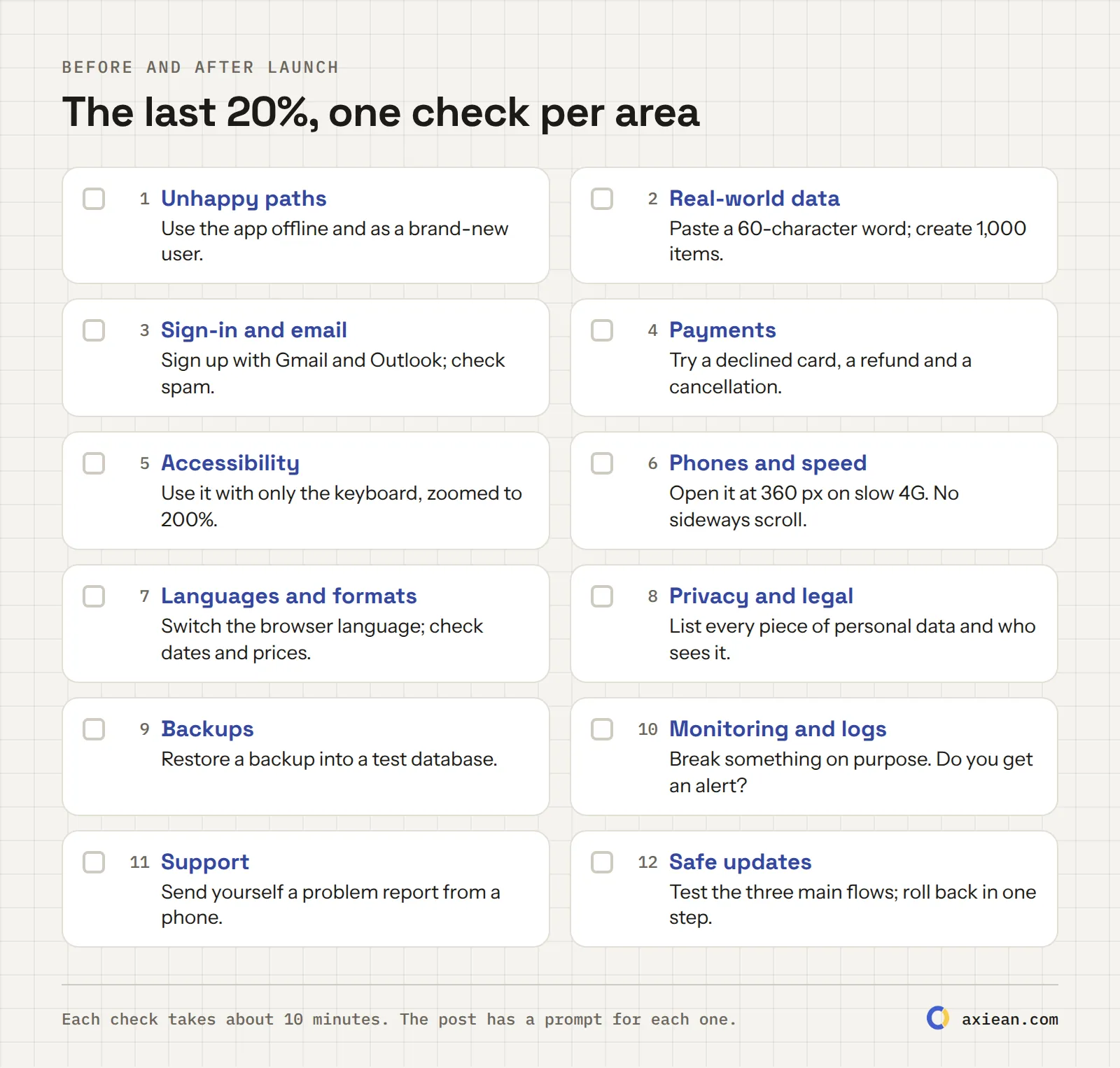
The last 20%, one check per area. Print it or keep it next to your task list.
What to do first
You don't need everything before day one. Here's the order I'd use:
When
Do this
Before launch
The security checklist, backups (9), sign-in and email (3), payments (4) if you charge money, a privacy policy (8)
First week
Unhappy paths (1), phones (6), a way to reach you (11), an uptime monitor (10)
First month
Real-world data (2), accessibility (5), tests for the main flows (12)
When you grow
Languages (7), speed tuning (6), more tests and better monitoring
How long does it take? There's no honest single number. My rule: plan as much time for the last 20% as the demo took, and don't be surprised if it takes more. That's the ninety-ninety rule.
Then launch, and keep going
The last 20% is also great material for your build log. "Why our emails went to spam, and how I fixed it" is exactly the kind of entry people search for. I wrote about why a build log beats a single launch day.
AI can write most of the code of a production app, but it rarely finishes the production part on its own. Error handling, email delivery, accessibility, privacy, backups and monitoring usually need you to ask for them and check them. With clear requests and reviews, yes, you can ship a real product built mostly with AI.
What are the limitations of vibe coding?
Vibe coding builds the happy path fast, but without reading the code you don't know what's missing: security checks, error handling, edge cases and data safety. It's great for prototypes. For a product with real users, review the code or at least go through checklists like this one.
How do I turn a prototype into a production app?
Go through the last 20%: handle errors and empty states, test with real-world data, make sign-in and email reliable, handle payment failures, check accessibility and phones, write a privacy policy, set up backups and monitoring, give users a way to reach you, and add tests for the main flows. Start with security.
What should I check before launching an MVP?
At minimum: the security basics, working backups you've tested, reliable sign-in and email, correct payment handling if you charge money, and a privacy policy that matches what your app does. The rest can follow in the first weeks.
Do I need a privacy policy for a small app?
If your app collects any personal data, like an email address, you almost certainly need one, and in the EU the GDPR requires you to tell people how you use their data. Keep it short and true to what your code does. This isn't legal advice.
"Slop" was Merriam-Webster's word of 2025, and people now look for signs of it. What makes an AI-built product feel like slop, what makes it feel cared for, whether you should say you used AI, and what Google, the FTC and the EU AI Act say in 2026.
The words around building with AI change every few months. Here are 40 of them, explained in plain English: what they mean, where they came from and why they matter to you. From vibe coding and MCP to context engineering, slopsquatting and llms.txt.
··13 min read
A launch day gives you one chance to be noticed. A build log gives you a new chance every week. Why building in public helps people, Google and AI answers find your product, and a simple 15-minute routine to do it.

 Vahid Aslani