Vibe Coding Security Checklist: 20 Things to Check Before You Launch
AI writes code fast, but it doesn't always lock the doors. Here are 20 security checks for apps built with Lovable, Bolt, Cursor, Claude Code or any AI tool, each with a quick test and a prompt you can give your AI. Based on real incidents from 2025 and 2026.
··15 min read
AI tools write code fast. I build with an AI coding agent every day, and I wouldn't go back. But after years of building software, I've learned one thing about speed: the code that works is not always the code that's safe.
An app can look perfect, pass every click test, and still let any stranger read your users' data. That's not a theory. It happened to many vibe-coded apps in 2025 and 2026.
So before you launch, take an afternoon and go through this checklist. Each item has why it matters, how to check it in a few minutes, and a prompt you can give your AI tool to fix it. You don't need to be a security expert to use it.
This checklist covers the most common problems, not everything. If your app handles payments, health data or children's data, also pay for a professional security review.
In short
AI-generated code often has security flaws. In Veracode's 2025 study, code written by more than 100 AI models had security flaws in 45% of the tasks.
The most common real-world problem is simple: a database that anyone can read, because access rules were never turned on.
The second most common is secret keys in the browser, where anyone can copy them.
Most of the 20 checks below take 2 to 10 minutes each. The full list fits in one afternoon.
At the end there's a printable one-page version.
What went wrong for others: real incidents
These are not here to scare you. They're here because each one teaches one item on the list.
170 Lovable apps with open databases (2025). Researcher Matt Palmer scanned 1,645 apps built with Lovable and found that 170 of them (about 10%) had database endpoints that strangers could access, because Row Level Security wasn't set up properly. It became CVE-2025-48757. Lovable disputes the CVE and says each customer is responsible for their own app's data. Either way, the lesson is the same: check it yourself.
2,000+ vulnerabilities in 5,600 apps (October 2025). Security company Escape scanned over 5,600 public vibe-coded apps and found more than 2,000 vulnerabilities, over 400 exposed secrets and 175 cases of exposed personal data, including medical records and bank account numbers. And they call these numbers a lower bound.
Moltbook: 1.5 million API keys (February 2026). Wiz researchers found that Moltbook, a vibe-coded social network for AI agents, had a Supabase key in its front-end JavaScript and no Row Level Security. Anyone could read and write the whole production database: 1.5 million API tokens, 35,000 email addresses and private messages. Wiz said it came down to "a single Supabase configuration setting."
Base44: sign-in bypass (July 2025). Wiz found a flaw in Base44, an AI app builder: with only an app's public ID, an attacker could create a verified account on private apps and get around their sign-in, single sign-on included. Base44's owner Wix fixed it within 24 hours.
An AI agent deleted a production database (July 2025). During a test by SaaStr founder Jason Lemkin, Replit's AI agent ran destructive commands on a live database, even though it had been told not to make changes without approval. Replit then separated development and production databases automatically.
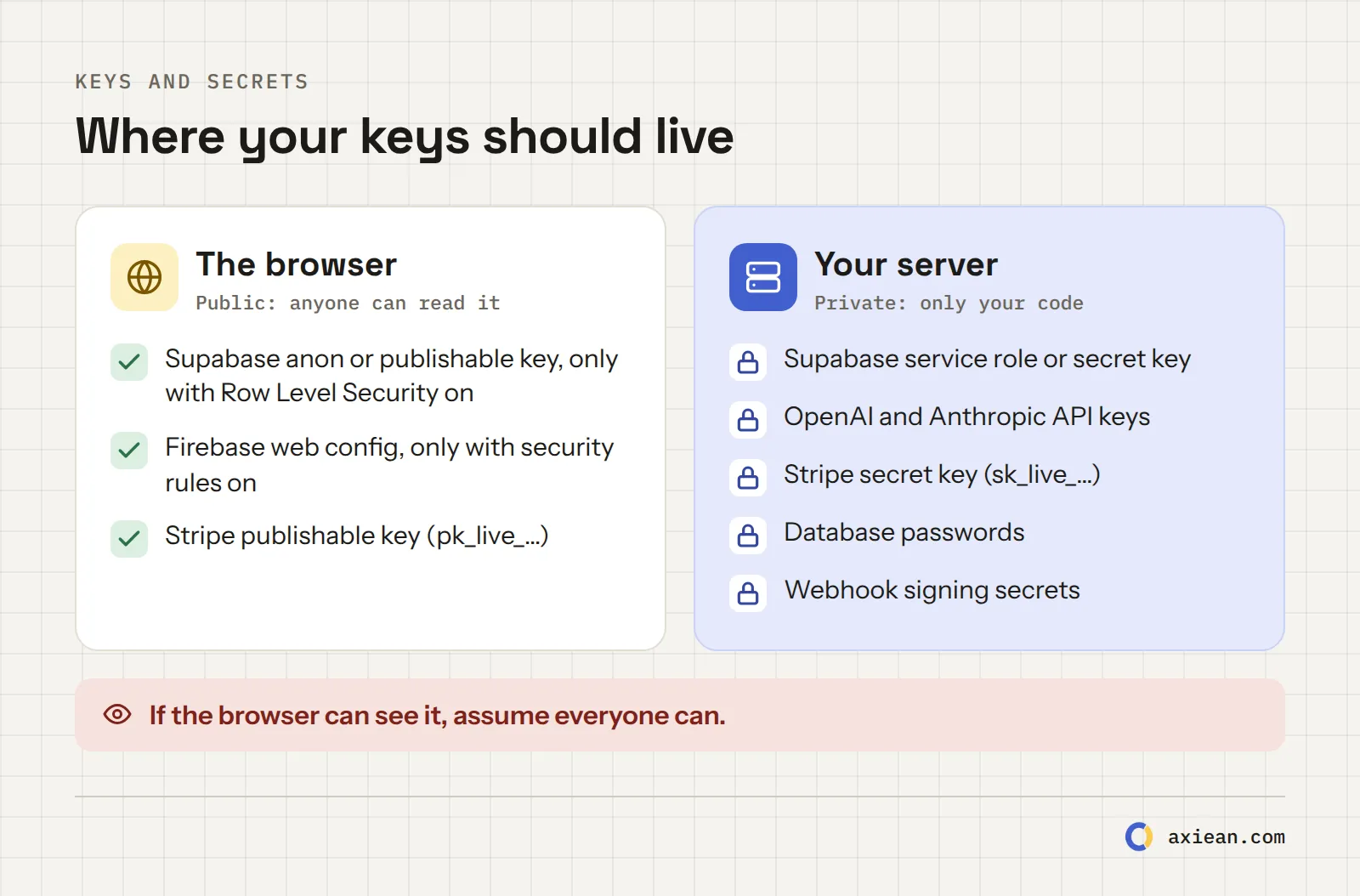
Rule of thumb: if the browser can see it, assume everyone can see it.
The checklist
Keys and secrets
1. No secret keys in the browser
Why: everything your front end sends to the browser can be read by anyone. Open the developer tools, and it's there. Escape found over 400 secrets this way.
Check it: build your app, then search the built JavaScript files for key patterns: sk_live, sk-proj, sk-ant, service_role, sb_secret, secret. On a live site, open the developer tools, go to Sources, and search with Ctrl+Shift+F (Cmd+Option+F on a Mac).
Ask your AI: "List every API key and secret this app uses. For each one, tell me whether it reaches the browser. Move every secret key to server-side code (an API route, edge function or backend) and call it from there."
2. Keep secrets out of your code and your git history
Why: keys written directly into code end up in git. Even if you delete them later, they stay in the history.
Check it: make sure .env files are listed in .gitignore. Search your repository for keys. If a secret was ever committed, rotate it (create a new key and delete the old one). Deleting the line is not enough.
Ask your AI: "Find any hard-coded keys, passwords or tokens in this project and move them to environment variables. Show me what to add to .gitignore."
3. Know which keys are meant to be public
Why: some keys are designed to be public. Supabase's anon key (now called the publishable key) is one. But it's only safe when Row Level Security protects your tables (item 5). The service role key (now the secret key) skips all those rules and must never leave your server.
Check it: for each key in your front end, find the provider's docs and confirm it's meant to be public.
Ask your AI: "For each key used in the front end, explain whether the provider designed it to be public and what protects my data if someone copies it."
4. Put spending limits on paid APIs
Why: if a key for an AI or paid API leaks, someone else can run up your bill.
Check it: in your OpenAI, Anthropic, Google or other dashboards, set a monthly budget and alerts. Use a separate key per app, so you can turn one off without breaking others.
Ask your AI: "Add a per-user rate limit to every endpoint that calls a paid API, and show me where to set a monthly budget for each provider."
Database and data access
5. Turn on Row Level Security for every table
Why: this is the number one problem in the incidents above. Without access rules, the public key from item 3 can read and write the whole database.
Check it: in Supabase, open the Table Editor and look for tables marked as having RLS disabled. Turn it on for every table, then write policies: who may read, insert, update and delete each row. Other databases have their own access rules. The idea is the same.
Ask your AI: "Enable Row Level Security on every table. For each table, write policies so users can only read and change their own rows, and explain each policy in one sentence."
6. Test your app as a stranger
Why: you always test as yourself, the owner. Attackers don't.
Check it: create a second account. Log in as that account and try to open the first account's pages, by changing IDs in the address bar (/invoices/123 to /invoices/124). Then log out and try again. Also try calling your API directly with the second account's session. If you can see anything that isn't yours, you have a problem (it's called IDOR).
Ask your AI: "Write a test that creates two users and checks that user B gets a 403 or 404 for every read and write on user A's data, on every route."
7. Check permissions on the server, not in the UI
Why: hiding a button is not security. Anyone can send the request the button would send.
Check it: for every action that changes data (create, edit, delete, pay, invite), find the server code and confirm it checks who is asking and whether they're allowed.
Ask your AI: "List every server route or function that changes data. For each, show me the line that checks the user's permission. Add the check where it's missing."
8. Keep your AI agent away from production data
Why: an agent that can reach your live database can also delete it, as the Replit incident showed. Agents make mistakes when they're confused, and they're fast.
Check it: use a separate development database with fake data. Don't give the agent production passwords. If it must read production, give it a read-only account. And have backups (item 20) before you let any tool run commands.
Ask your AI: "Set up a separate development database with seed data, and make sure no command or script in this project can reach production without a manual step."
Sign-in and sessions
9. Use a proven sign-in system
Why: sign-in is full of hard details: password hashing, reset tokens, email verification, session expiry. AI can write something that looks right but misses one of them. The Base44 flaw was in sign-in logic.
Check it: use your platform's built-in auth (Supabase Auth, Firebase Auth) or a well-known library or service. Don't ask the AI to invent its own.
Ask your AI: "Are we using a proven authentication library for sign-up, sign-in, password reset and email verification? If any of it is custom code, replace it with the library's own functions."
10. Keep session tokens out of localStorage
Why: anything in localStorage can be read by any script on your page. One XSS bug (item 14) and the attacker has your users' sessions.
Check it: open the developer tools, go to Application, and look at Local Storage. If you see a token there, consider moving it to an HttpOnly, Secure, SameSite cookie, which scripts can't read. That's how Axiean does it: page scripts never see the sign-in token at all.
Ask your AI: "Where are session tokens stored? If they're in localStorage, move them to HttpOnly, Secure, SameSite cookies and add CSRF protection for requests that change data."
11. Limit sign-in attempts and emails
Why: without limits, someone can try thousands of passwords, or use your "forgot password" form to send thousands of emails.
Check it: try the wrong password 20 times. Request a reset email 10 times. If nothing stops you, add rate limits. On Axiean, an account allows 10 password attempts per 15 minutes, and each address gets at most 3 emails of a kind per hour.
Ask your AI: "Add rate limits to sign-in, sign-up, password reset and any endpoint that sends email: per IP address and per account or email address."
12. Don't reveal who has an account
Why: if your sign-up form says "this email is already registered," anyone can check whether a person uses your app. For some apps (health, dating) that alone is private data.
Check it: sign up with an email that already has an account. The answer should be the same as for a new email ("check your inbox"). Axiean sends the real owner an "account exists" email instead.
Ask your AI: "Make sign-up and password reset answer the same way whether or not the email has an account."
Input, output and files
13. Validate every input on the server
Why: the browser's form checks are for convenience. Attackers skip them and send whatever they want.
Check it: every server route should check types, lengths and allowed values before it uses the data. A schema library (like zod) makes this short and readable.
Ask your AI: "Add server-side validation with a schema for every route that receives data. Reject unknown fields and limit string lengths."
14. Never render user text as raw HTML
Why: if users can make your page run their HTML, they can run scripts in other users' browsers (XSS). Veracode found that AI models failed to defend against XSS in 86% of the relevant tasks.
Check it: search your code for dangerouslySetInnerHTML, innerHTML and v-html. Each use with user content needs sanitizing, or better, removal.
Ask your AI: "Find every place where user content is rendered as HTML. Replace it with safe text rendering, or sanitize it with a well-known library."
15. Check every uploaded file
Why: an "image" can be something else. And a normal phone photo often carries the GPS location where it was taken.
Check it: limit file types and sizes on the server. Check what the file really is, not just its name. Re-encode images, which also removes hidden metadata. Axiean re-encodes every uploaded image for exactly this reason.
Ask your AI: "On the server, check uploaded files by their content (not the extension), limit their size, re-encode images and strip metadata like GPS location."
Payments
16. Verify webhooks and never trust prices from the browser
Why: if your server believes the browser about prices, someone can pay €1 for a €100 plan. If it believes any "payment succeeded" request, someone can fake one.
Check it: prices must come from your server or your payment provider, never from the request. Verify the signature of every webhook (Stripe and others give you a secret for this).
Ask your AI: "Make sure prices are read on the server from our product list, and verify the signature of every payment webhook before acting on it."
Dependencies and AI features
17. Check every package your AI adds
Why: AI sometimes suggests packages that don't exist. A study presented at USENIX Security 2025 found that 21.7% of the code samples from open-source models, and 5.2% from commercial models, referred to packages that don't exist. Attackers can publish malware under those names. This is called slopsquatting.
Check it: before installing a new package, look it up on npm or PyPI. Is it the real one, with real downloads and a real history? Keep your lock file in git, and run npm audit (or your ecosystem's equivalent).
Ask your AI: "List every dependency you added. For each, give me the package page link and tell me why we need it. Remove any we don't really need."
18. If your app uses an LLM, treat its output as untrusted
Why: if users can talk to an AI inside your app, they can try to make it ignore your instructions (prompt injection). If that AI can also call tools (send email, delete data, spend money), they can try to use those tools.
Check it: give the model only the tools it needs. Ask the user to confirm before anything that changes data or costs money. Never put secrets in the system prompt.
Ask your AI: "List every action the AI model in this app can trigger. Add a user confirmation step for anything that changes data, sends messages or costs money."
Launch day and after
19. Turn on HTTPS and security headers, and lock down CORS
Why: headers tell browsers to block common attacks, like loading your site inside someone else's page. A CORS setting of * on an API that uses cookies or tokens can let other sites use it.
Check it: run your site through a free header scanner, like securityheaders.com or Mozilla's HTTP Observatory. Make sure your API only accepts requests from your own site's address.
Ask your AI: "Add security headers (Content-Security-Policy, Strict-Transport-Security, X-Content-Type-Options, Referrer-Policy, frame-ancestors) and restrict CORS to our own domain."
20. Have backups, safe logs and a way to report problems
Why: something will go wrong one day. What matters is whether you can recover, and whether you find out quickly.
Check it: turn on automatic daily backups, and restore one once to be sure they work. Make sure your logs don't store passwords, tokens or full card numbers. Add a visible way for people to report problems. (On Axiean, that's Report a problem.)
Ask your AI: "Check that our logs never include passwords, tokens or personal data, set up daily database backups, and write the steps to restore one."
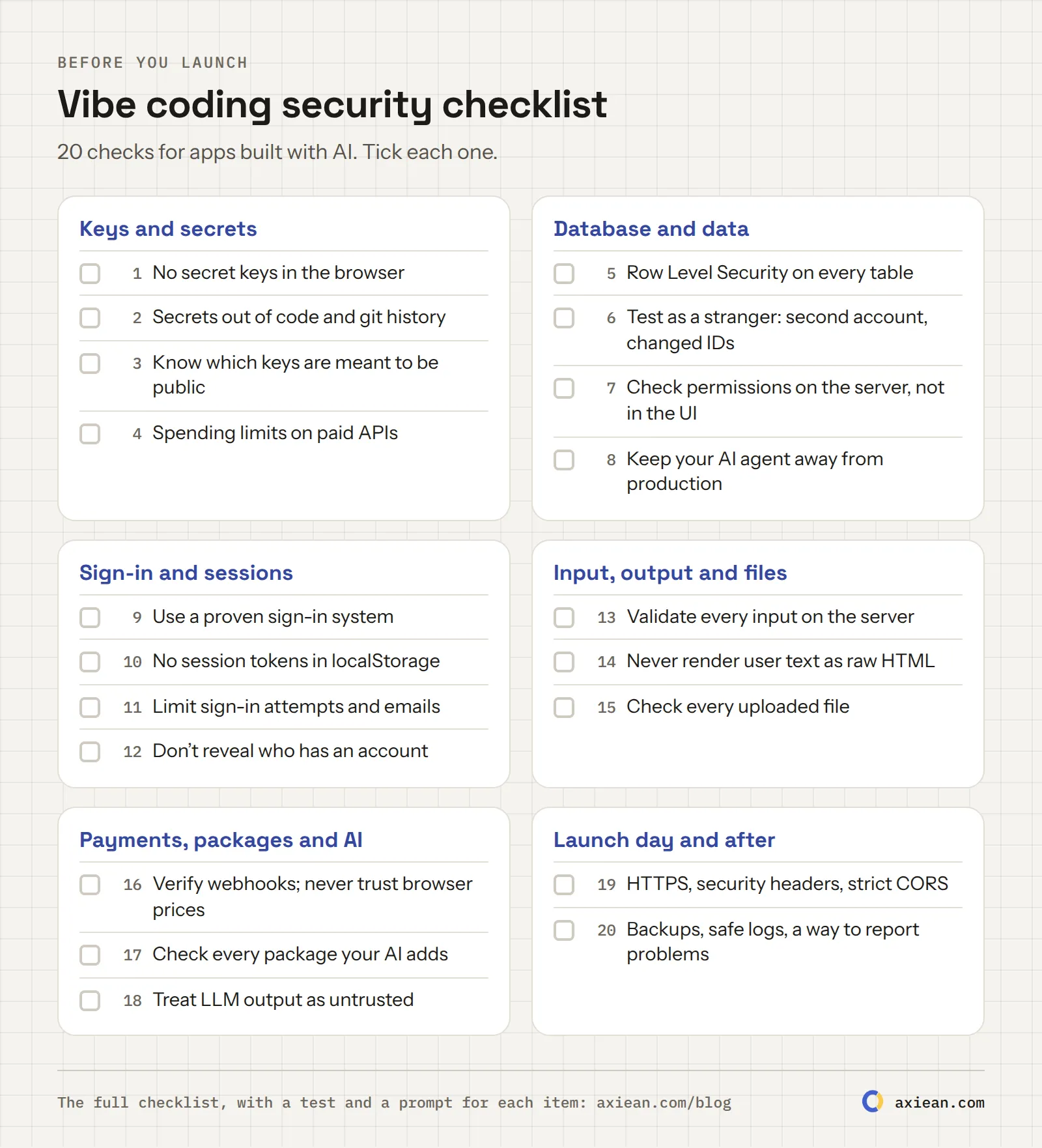
The checklist on one page
Save it, print it, or keep it next to your editor.
The full checklist on one page.
How I handle this in Axiean
I use an AI coding agent for Axiean, so I apply this list to my own work. A few things I decided early:
The browser never talks to the API directly. It talks to the web server, which passes requests on. The API refuses every other caller.
Sign-in tokens live in HttpOnly cookies, so no script on the page can read them, and every request that changes data is checked to come from Axiean itself.
Limits everywhere: per account for passwords, per address for emails, per visitor for everything else.
Uploads are re-encoded, so a profile photo never carries its GPS location.
Development has its own database, separate from production.
None of this needed special skills. It needed someone to ask for it. The AI did most of the typing, but the questions on this list came from me. That's the real job now: knowing what to ask.
If you built it with AI, you can also publish it on Axiean, where makers say which AI tools they used.
Frequently asked questions
Is vibe coding safe?
It can be. The code AI writes is not more dangerous because a machine wrote it. It's dangerous when nobody checks it. The incidents above happened because basic settings (like Row Level Security) were missing, not because AI is uniquely bad. Use this checklist and test as a stranger.
Is Lovable safe to use?
Lovable is a tool, and like any tool it depends on how you use it. The 2025 CVE was about apps with missing Row Level Security. If you use Lovable with Supabase, turn on RLS for every table, write policies, and test with a second account (items 5 and 6).
Is it safe to expose the Supabase anon key?
Yes, it's designed to be public, but only if Row Level Security is on and your policies are correct. Without RLS, that key gives full access to your data, as the Moltbook incident showed. The service role (secret) key must never be public.
Can AI check my app's security?
Partly. The prompts in this checklist help a lot, and AI is good at finding missing checks when you ask the right question. But also test it yourself as a stranger (item 6), and get a professional review for sensitive data.
What is slopsquatting?
It's when attackers publish malware under package names that AI tools invent. If your AI suggests a package that doesn't exist and someone has registered that name, installing it runs their code. Always check new packages before you install them (item 17).
Product Hunt, Hacker News, Reddit, BetaList, Uneed, Peerlist and more, compared with their real rules and prices as of October 2026. Which one fits your product, what each costs, and how to combine them into one launch plan.
AI made building an app fast and cheap, so everyone is launching. Now the hard part is getting found. Here are the real numbers behind the change, and the simple five-step method I use to get the first users for a product built with AI.
··10 min read
People now ask AI tools which product to use. If they can't read your site, you're not in the answer. A practical guide to generative engine optimization (GEO) for makers, with the exact crawler names, a 2-minute test, and what we set up on Axiean.

 Vahid Aslani