How to Get Your Product Mentioned by ChatGPT, Perplexity and Google AI Mode: A GEO Guide for Makers
People now ask AI tools which product to use. If they can't read your site, you're not in the answer. A practical guide to generative engine optimization (GEO) for makers, with the exact crawler names, a 2-minute test, and what we set up on Axiean.
··12 min read
More and more people don't search for "invoice app for freelancers" and click ten links. They ask ChatGPT, Perplexity, Claude or Google's AI Mode: "What's a good invoice app for freelancers?" Then they try the two or three names in the answer.
If your product isn't one of those names, the user never sees you, no matter how good your Google ranking was.
When I built , I spent real time on this. Not because there's a magic trick, but because a lot of products built with AI are invisible to AI tools for a few simple, fixable reasons. This guide explains them, step by step, in plain words.
In short
GEO (generative engine optimization) means making your content easy for AI tools to find, understand and cite. A 2024 research paper presented at KDD showed it can raise visibility in AI answers by up to 40%.
OpenAI, Anthropic and Perplexity each have a crawler (separate from training). Blocking it can keep you out of their answers.
Step 1: let the right crawlers in.
search
Step 2: make sure they can read your page. Many AI-built apps send an empty page and build everything with JavaScript. Major AI crawlers don't run JavaScript.
Step 3: write what AI can quote: who it's for, clear facts, numbers with sources, comparisons, questions and answers.
Steps 4 to 6: add structured data, get mentioned on other trusted sites, and check your results once a month.
llms.txt is cheap to add, but don't expect miracles. Google says it doesn't need it.
What is GEO, and how is it different from SEO?
SEO is about ranking in a list of links. GEO is about being in the answer that an AI tool writes.
The term comes from a research paper by Pranjal Aggarwal and colleagues, including researchers from Princeton University, accepted at the KDD 2024 conference. They tested different ways of writing content and found that some, like adding statistics, quotes and sources, made content appear more often in AI answers. Their summary: GEO "can boost visibility by up to 40% in generative engine responses."
SEO
GEO
Goal
Rank high in a list of links
Be named or cited in an AI answer
Who reads your page
Googlebot, then a person
A search crawler, then an AI model, then a person
What wins
Relevance, links, a good page
Clear facts, sources, being mentioned in many trusted places
Can they read JavaScript?
Google: usually yes
Most AI crawlers: no
The good news: they mostly overlap. Google says its AI Overviews and AI Mode have no additional technical requirements beyond normal Search. Your page has to be indexed and eligible to show a snippet. Good SEO is the base of good GEO.
How an AI answer finds your product
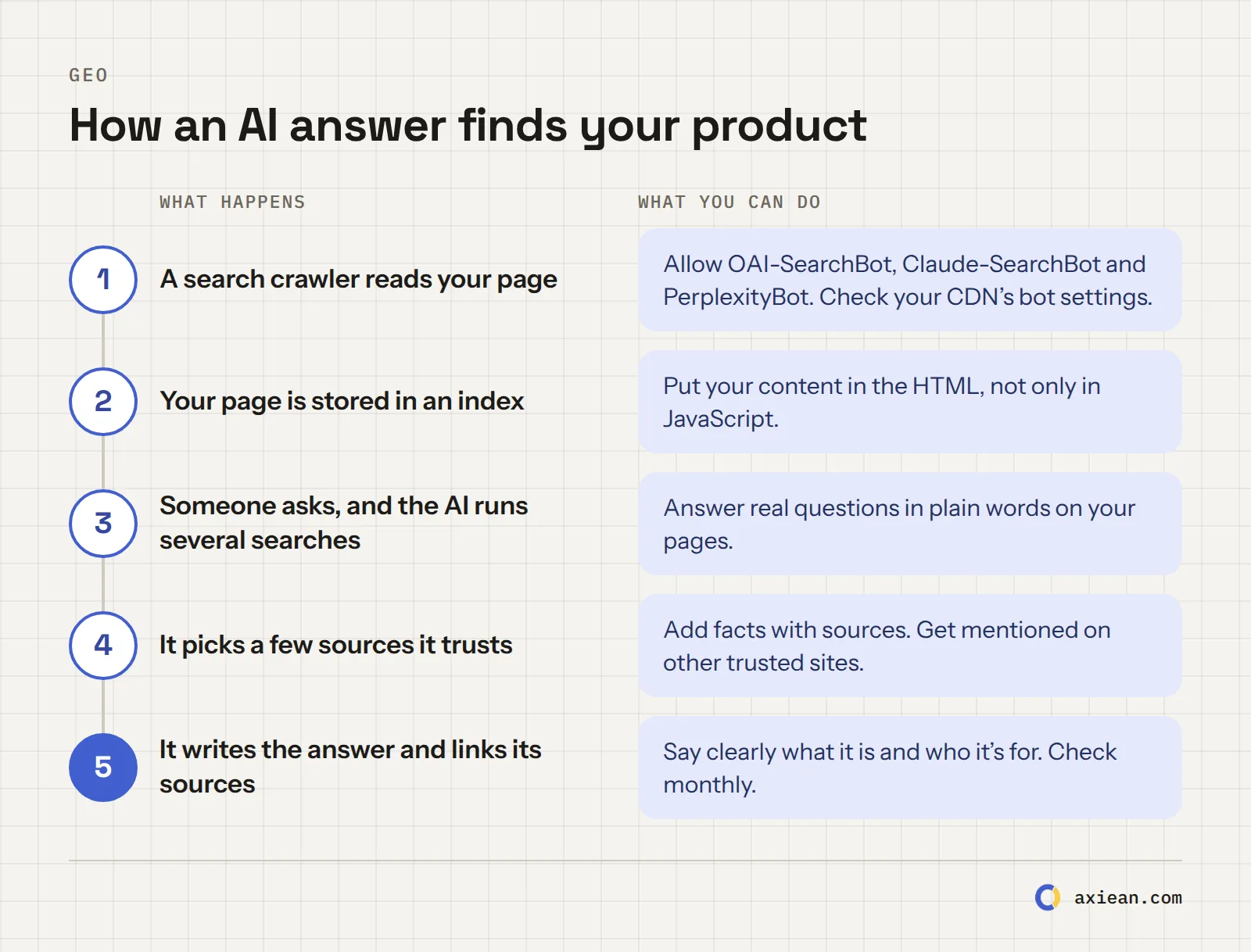
The path from your page to an AI answer, and what you can do at each step.
Most AI search tools work in a similar way. A crawler reads pages ahead of time. When someone asks a question, the AI runs one or more searches (Google calls this "query fan-out"), reads the best results, and writes an answer with links to its sources.
So there are three ways to be missing: the crawler never read your page, it read it but found nothing useful, or other sources looked more trustworthy. The six steps below cover all three.
Step 1: Let the right crawlers in
Each AI company has more than one bot, and they do different jobs. This is the most important table in this guide:
Bot
What it does
Block it and...
OAI-SearchBot (OpenAI)
Finds pages for ChatGPT search
you won't be shown in ChatGPT search answers
GPTBot (OpenAI)
Collects pages for model training
your content isn't used for training
ChatGPT-User (OpenAI)
Visits a page when a user asks
robots.txt may not apply (user-initiated)
Claude-SearchBot (Anthropic)
Indexes pages for Claude's search
your content isn't indexed for search
Claude-User (Anthropic)
Visits a page when a user asks
less visibility in user-directed search
ClaudeBot (Anthropic)
Collects pages for model training
your content isn't used for training
PerplexityBot (Perplexity)
Finds pages for Perplexity's answers
you're not shown in Perplexity results
Perplexity-User (Perplexity)
Visits a page when a user asks
generally ignores robots.txt
Googlebot (Google)
Normal Search, including AI Overviews and AI Mode
you're out of Google completely
Google-Extended (Google)
A control for Gemini training, not a crawler
no effect on Google Search
Sources: OpenAI, Anthropic, Perplexity. OpenAI writes it directly: "we recommend allowing OAI-SearchBot in your site's robots.txt file."
The key idea: search bots and training bots are separate. You can say no to training and still be in the answers:
# Allow AI search, block AI training
User-agent: OAI-SearchBot
User-agent: Claude-SearchBot
User-agent: PerplexityBot
Allow: /

User-agent: GPTBot
User-agent: ClaudeBot
Disallow: /
Whether you block training is your choice. On Axiean, I decided to allow all of them, because Axiean exists to help products get found. You can see our full robots.txt: it lists 17 AI agents by name.
Check your hosting too. Since July 2025, Cloudflare blocks AI crawlers by default for new sites unless you allow them. Some hosts and security plugins do similar things. Your robots.txt can say "welcome" while your firewall says "no." Check both.
Changes aren't instant. OpenAI and Perplexity both say it can take about 24 hours for their systems to notice a robots.txt change.
Step 2: Make sure they can read your page
This is where many AI-built apps fail without knowing it.
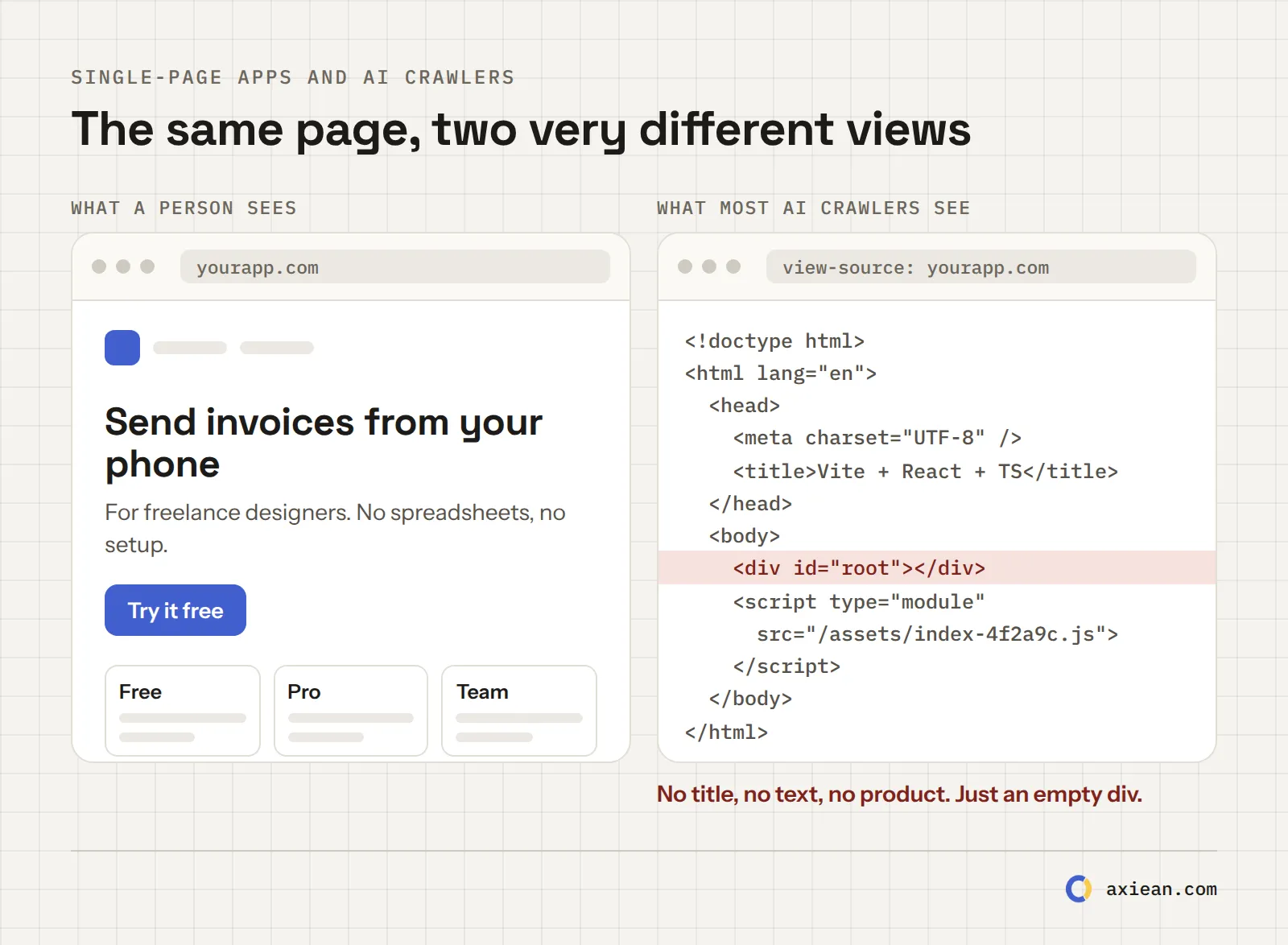
Tools like Lovable, Bolt and v0 often produce single-page apps. The server sends a nearly empty HTML file, and JavaScript fills it in the browser. A person sees a beautiful page. Google usually runs the JavaScript and sees it too.
But a study by Vercel and MERJ found that none of the major AI crawlers, including GPTBot and ClaudeBot, run JavaScript. They download the HTML, and that's all they read. They also spent over a third of their requests on pages that returned 404, so broken links waste their visits too.
The same page, as a person sees it and as most AI crawlers see it.
The 2-minute test. Open a terminal and run this (with your own address):
curl -s -A "OAI-SearchBot" https://yourapp.com | grep -i -E "<title>|<h1|description"
If you see your title, a heading and a description that explains your product, you're fine. If you see almost nothing, or only <div id="root"></div>, AI crawlers see an empty page.
You can also open your page, right-click, choose View Page Source (not "Inspect"), and search for a sentence from your page. If it's not in the source, it's not there for AI crawlers.
How to fix it, from easiest to hardest:
Add a static landing page for your product: plain HTML, rendered on the server, with what it is, who it's for, features, pricing and FAQs. Keep the app itself as it is.
Pre-render your public pages at build time (many frameworks and hosts can do this).
Move to a framework with server rendering (Next.js, Nuxt, SvelteKit, Astro, Remix).
Get a server-rendered page elsewhere. A project page on Axiean is rendered on the server, with structured data, in three languages. It's not a replacement for your own site, but it's a readable page about your product that AI crawlers can use today.
Step 3: Write content that AI can quote
AI tools pick sentences they can use with confidence. Help them:
Say who it's for, in the first lines. "X is an invoice app for freelance designers" is something an AI can repeat. "Reimagine your workflow" is not. (This is step F in my FOUND method.)
Use real facts and numbers, with sources. The GEO paper found that adding statistics, quotes and citations helped most.
Answer real questions in headings: "How much does X cost?", "Does X work offline?", "X vs Y". People ask AI tools in this shape.
Make comparison tables. When someone asks "what's the best tool for…", the AI looks for pages that compare. Be honest about where others are better. It makes the rest more believable.
Keep it fresh. Put a date on facts, and update pages when things change. A build log gives you new, dated pages without extra effort.
Step 4: Add structured data
Structured data (JSON-LD with schema.org) describes your product in a format machines read without guessing. It's not a magic switch. Google says AI features need no special markup. But it removes doubt about basic facts: name, category, price, who made it.
A minimal example for a web app:
{
  "@context": "https://schema.org",
  "@type": "SoftwareApplication",
  "name": "Your App",
  "description": "An invoice app for freelance designers. Send an invoice from your phone in under a minute.",
  "applicationCategory": "BusinessApplication",
  "operatingSystem": "Web, iOS, Android",
  "url": "https://yourapp.com",
  "offers": { "@type": "Offer", "price": "0", "priceCurrency": "USD" },
  "author": { "@type": "Person", "name": "Your Name" }
}
Put it in a <script type="application/ld+json"> tag in the page's HTML, rendered on the server (not added by JavaScript later, for the reason in step 2). Check it with Google's Rich Results Test.
Step 5: Get mentioned on other trusted sites
AI tools rarely trust a product only because its own website says it's great. They look for the same name in several independent places: directories, reviews, comparison articles, community threads, launch sites.
That's why launches matter for GEO too, not just for one day of traffic. Every good, permanent page about your product on a trusted site is one more source an AI can find. My guide on where to launch your product compares nine of them.
A few tips:
Use the same name and the same one-line description everywhere. It helps AI connect the mentions.
Answer questions where your users ask them (forums, Reddit, Q&A sites), when your product is really the answer, and say that it's yours.
Write one genuinely useful article about the problem you solve. Useful articles get linked, and links get read.
What about llms.txt?
llms.txt is a Markdown file at the root of a site, proposed by Jeremy Howard in September 2024 to "help agents use a website." It's a short map of your most important pages, written for AI.
The honest status in October 2026: it's useful for AI agents and coding tools that look for it when they need information, but no major AI search engine has said it uses llms.txt to choose sources, and Google says you don't need any new files for its AI features.
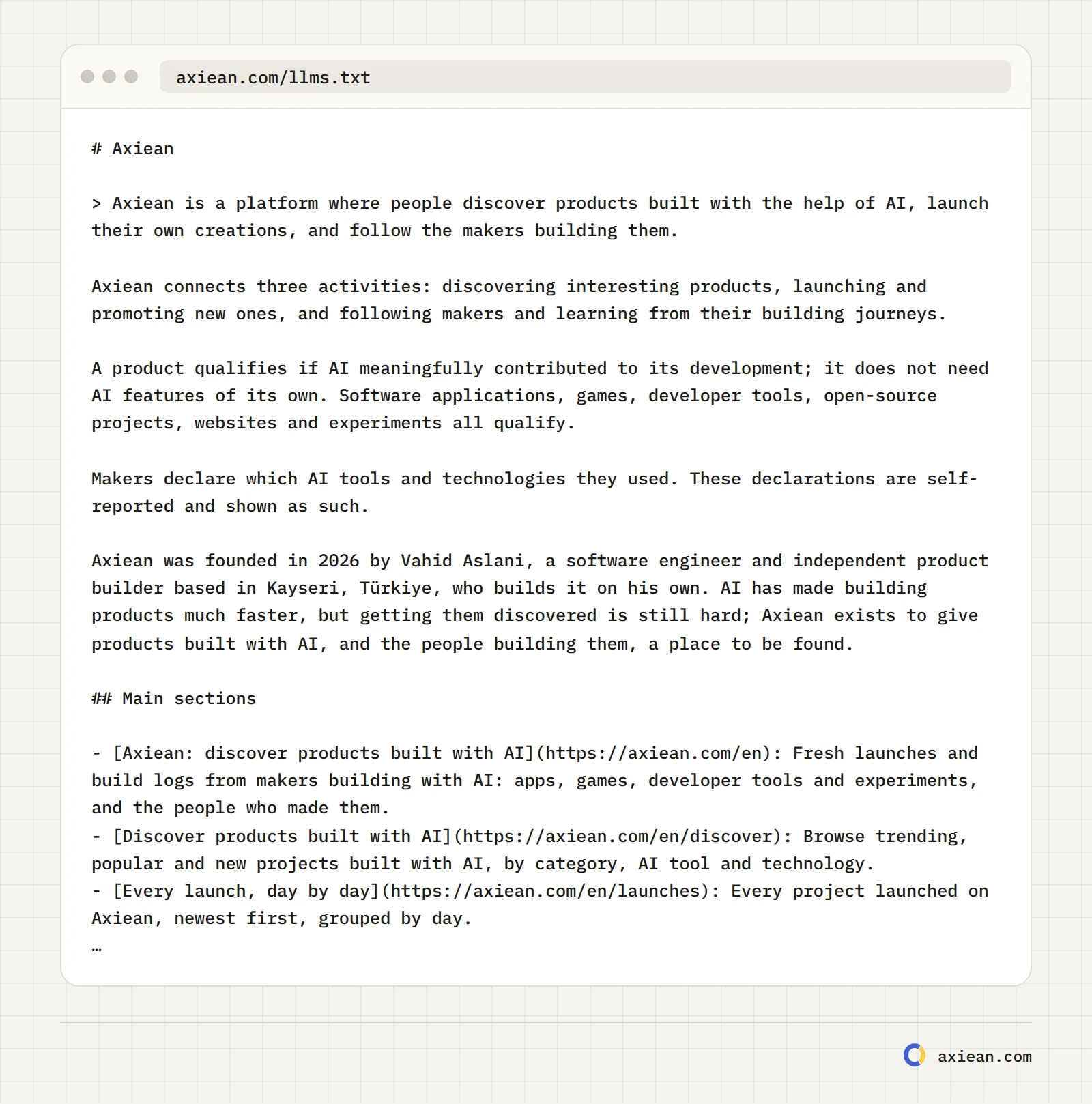
I added one to Axiean anyway, because it took little time and costs nothing to keep updated. Axiean generates it automatically from the site: a summary, the main sections, the latest posts and the most active categories and tools, in three languages. There's also a longer llms-full.txt with all our facts, questions and answers.
The start of Axiean's llms.txt, generated from the site.
My advice: do steps 1 to 5 first. Add llms.txt if you have ten minutes left.
Step 6: Measure it once a month
You can't see an "AI ranking" in a dashboard yet, so measure it by hand:
Write 10 questions your users would really ask, like "best invoice app for freelancers" or "how to send an invoice from my phone."
Once a month, ask them in ChatGPT (with search), Perplexity, Claude and Google AI Mode. Write down in a spreadsheet whether you're named, linked, or missing, and who is named instead.
Check your analytics for visitors coming from chatgpt.com, perplexity.ai, claude.ai and gemini.google.com. Some AI visits arrive without a referrer, so this count is a minimum.
Check your server logs for visits from OAI-SearchBot, Claude-SearchBot and PerplexityBot. If they never come, go back to step 1.
When you're missing, look at who is named and why: they usually have a clearer page, a comparison table, or more mentions on other sites.
What we set up on Axiean
So you can see that this is practical, here's what Axiean does today:
Every public page is rendered on the server. Crawlers that don't run JavaScript get the full content.
Titles and descriptions come first. Bots that don't run JavaScript get them in the page's <head>, not streamed in later.
Structured data on every page:SoftwareApplication for projects, ProfilePage and Person for makers, BlogPosting for posts and build log entries, BreadcrumbList everywhere.
A robots.txt that names 17 AI agents and allows all of them on public pages.
llms.txt and llms-full.txt, generated from the site in English, Spanish and Turkish.
Sitemaps with every language version, so each page is found in its own language.
So when you publish a project on Axiean, you get a page built for this from day one. It won't guarantee that ChatGPT names your product. Nothing can. But it removes the technical reasons it couldn't.
A one-hour GEO checklist
Task
Time
Done when
Check robots.txt for the search bots
5 min
OAI-SearchBot, Claude-SearchBot and PerplexityBot are allowed
Check your CDN or firewall AI bot settings
5 min
Nothing blocks them by default
Run the curl test on your main page
2 min
Your title, heading and description are in the HTML
Rewrite your first paragraph
15 min
It says what it is and who it's for, in one sentence
Add an FAQ section with 5 real questions
15 min
Each answer is two or three sentences
Add SoftwareApplication structured data
10 min
It passes the Rich Results Test
Write your 10 test questions
5 min
They're in a spreadsheet with today's date
Frequently asked questions
What is GEO in SEO?
GEO stands for generative engine optimization: making your content easy for AI tools like ChatGPT, Perplexity, Claude and Google AI Mode to find, understand and cite in their answers. It builds on SEO, and most good SEO practices also help GEO.
How do I get my website mentioned by ChatGPT?
Allow OAI-SearchBot in your robots.txt, make sure your page's content is in the HTML (not only built by JavaScript), state clearly what your product is and who it's for, and get mentioned on other trusted sites. Then check monthly by asking ChatGPT with search the questions your users ask.
Should I block GPTBot?
It's your choice. Blocking GPTBot keeps your content out of OpenAI's model training, but it doesn't remove you from ChatGPT search, which uses OAI-SearchBot. Many sites block training bots and allow search bots.
Does llms.txt help with SEO or GEO?
There's no public evidence that it changes rankings or citations in AI search. Google says it doesn't need it. It can help AI agents that look for it, and it's cheap to add, so it's a nice extra after the basics.
How long does it take for AI tools to notice changes?
Robots.txt changes take about 24 hours for OpenAI and Perplexity, according to their own documentation. Being cited is slower: the crawlers have to visit again, and your page has to be among the best sources for a question. Think in weeks, and measure monthly.
AI writes code fast, but it doesn't always lock the doors. Here are 20 security checks for apps built with Lovable, Bolt, Cursor, Claude Code or any AI tool, each with a quick test and a prompt you can give your AI. Based on real incidents from 2025 and 2026.
Product Hunt, Hacker News, Reddit, BetaList, Uneed, Peerlist and more, compared with their real rules and prices as of October 2026. Which one fits your product, what each costs, and how to combine them into one launch plan.
··11 min read
AI made building an app fast and cheap, so everyone is launching. Now the hard part is getting found. Here are the real numbers behind the change, and the simple five-step method I use to get the first users for a product built with AI.
 Vahid Aslani